
AI Auto Rejection: How AIxVIM Keeps Unrelated Documents Out of Your VIM Workflows
Not every PDF in your inbound channel is an invoice or an order confirmation. AIxVIM AI Auto Rejection scores every incoming document for SAP VIM and OpenText Vendor Invoice Management and rejects unrelated attachments automatically, before a DP Document or a workflow is created. Here is how the feature works and what it changes for validation users, business teams and administrators.
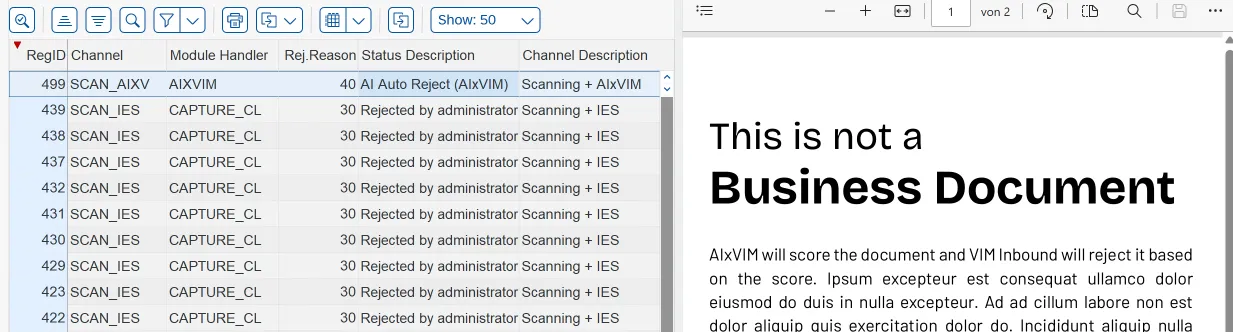
Everyone who works with SAP VIM knows the pattern. A vendor sends an invoice by email and attaches the general terms and conditions. An order confirmation arrives together with a data sheet, a drawing, a delivery schedule and a safety certificate. Someone forwards a marketing brochure to the invoice mailbox. All of it lands in the inbound channel, all of it gets manually rejected or becomes a DP Document and some of it starts a workflow that someone has to stop by hand.
That someone is rarely just the administrator. The validation client user sees the attachment first and has to reject it before touching the next real document. If it slips through, the AP clerk or the buyer finds it in their work queue, opens it, realizes it is a price list, and has to get rid of it. And when nobody catches it, the administrator gets the ticket. Three groups, one piece of noise, and none of them signed up to sort a vendor’s email attachments.
Order confirmations are the worst offenders. Where an invoice email typically carries one or two extra files, an order confirmation routinely comes with three, five or more attachments that have nothing to do with the confirmation itself. Every one of them becomes a registration, and every registration becomes a work item for someone.
In classic setups with IES or Capture Client, this is where the validation step earns its keep: a human looks at the document, recognizes it is not an invoice or an order confirmation, and rejects it. That is precisely the step AIxVIM removes. AIxVIM is AI-based document extraction for SAP VIM that replaces the capture layer and lets you ditch validation altogether. Which raises an obvious question: if nobody validates, who catches the terms and conditions and the data sheets?
Scoring instead of sorting
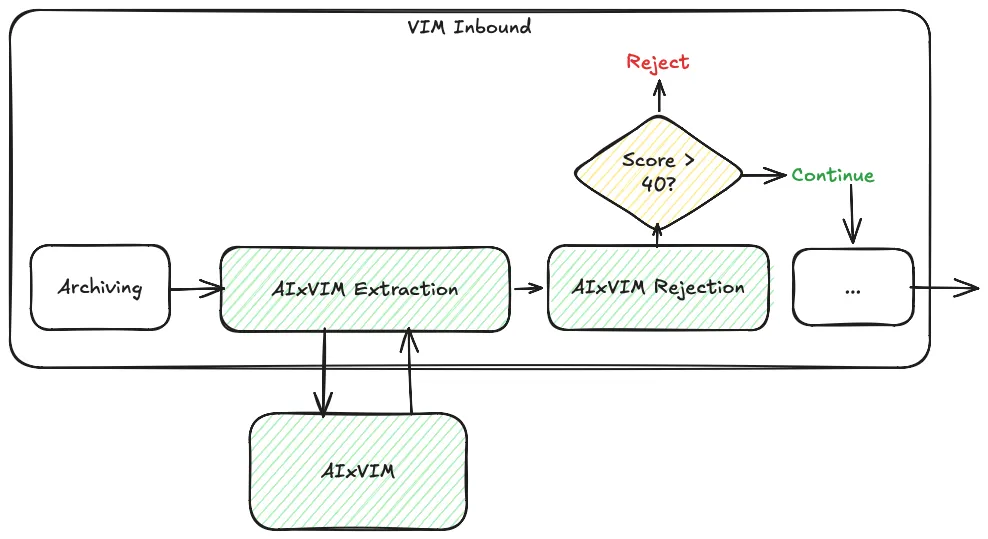
The answer is the AI Auto Rejection feature. When a document arrives through the AIxVIM channel, the AI does more than extract header and line item fields. It scores the document on whether it is a business document that should start a workflow in this scenario at all - an invoice or credit memo in the invoice channel, an order confirmation in the order confirmation channel - or something that merely arrived alongside one.
Terms and conditions, price lists, technical drawings, certificates, brochures, cover letters, blank pages: these score low. The score is passed back to VIM Inbound together with the extraction result, and VIM Inbound rejects the document based on it (the score can be configured). No DP Document is created, no Process Type is determined, no business rules run, no Role receives a work item. The document simply never enters the process, and none of the three groups above ever sees it.
The scoring is a classification decision, not a keyword match. A data sheet that quotes the PO number does not become an order confirmation, and a scanned invoice with poor image quality does not become an attachment. The same model that reads the document decides what the document is, in the context of the scenario it was received in.
Fully integrated in VIM Inbound Administration
The important part for administrators: everything is visible and transparent inside SAP VIM. AIxVIM registers as its own inbound channel with its own module handler. Auto-rejected documents show up in VIM Inbound Administration like any other rejected registration, with their own rejection reason and a status description that makes the origin clear: “AI Auto Reject (AIxVIM)”.
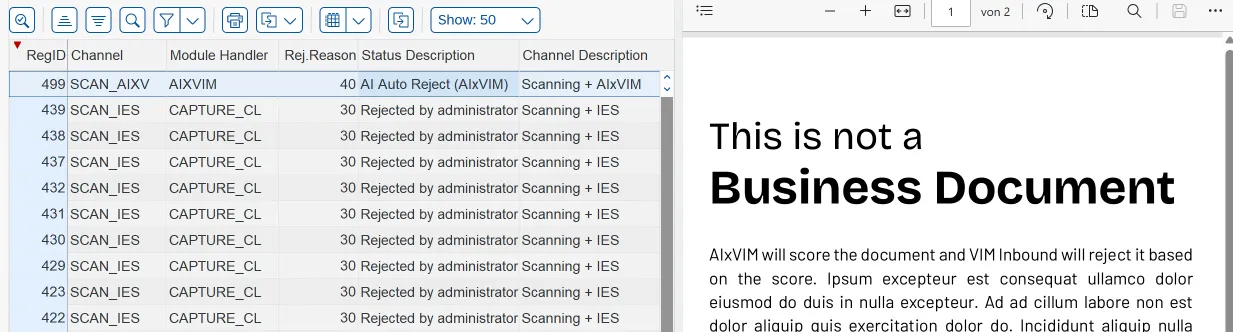
Sitting next to the familiar “Rejected by administrator” entries from manual channels, the difference is visible at a glance. The manual entries each represent a person who opened a document, read it, and clicked reject. The AIxVIM entries represent the same outcome without the person.
Because the rejection lives in the standard inbound tables, everything you already do with rejected documents keeps working. You can filter by channel or rejection reason, review what was rejected and why, and re-register a document manually if required. The original file stays attached to the registration, so a spot check takes seconds. There is no second admin tool, no separate log to reconcile, and no change to your existing reporting.
What this saves in practice
The time argument is simple. Every attachment that would have started a workflow is a DP Document that no longer needs to be opened, recognized as noise, and rejected by a validation user, an AP clerk, a buyer or an administrator. For order confirmation processing in particular, where a single confirmation regularly arrives with several unrelated attachments, this removes a noticeable share of the daily inbound volume before anyone sees it.
The frustration argument is at least as strong. Noise in the work queue is demoralizing precisely because it is trivial: it takes attention without requiring judgment. For the business team it also breaks concentration in the worst way, because the work item looks like a real task until it is opened. Removing it does not just cut minutes, it removes the part of the job people resent most. And it removes a source of process errors, because an attachment that slips through and gets posted as a zero-value invoice, blocks a real one in duplicate check, or updates a PO with data from a drawing is a real cleanup effort, not a hypothetical one.
For customers moving from IES or Capture Client to AIxVIM, Auto Rejection is what makes the “no validation step” promise hold up under real inbound conditions across all scenarios. Extraction quality gets you out of validating invoices and order confirmations. Auto Rejection gets you out of validating everything else.
Getting started
AIxVIM connects to VIM via the Core Capture API and works with every VIM version that supports it. Auto Rejection is part of the standard inbound handling for every AIxVIM scenario and needs no additional configuration in VIM beyond the AIxVIM channel itself. If you want to see how the scoring handles your own inbound mix, get in touch and we will run it against a sample of your documents.