
Header Match in SAP VIM: MIRO Proposal Replaces OCR Line Items
The header match (/OPT/CL_D_LM_MAP_HEADER_PO) replaces OCR line items with the PO’s MIRO proposal when PO, GR and invoice amounts match. What it does, how to enable it, when it pays.

What it is
Every VIM system carries a list of logic modules that nobody ever reads to the end. /OPT/CL_D_LM_MAP_HEADER_PO sits somewhere in that list, and in most installations it has never been switched on. What it does is blunt: it throws away the line items the invoice arrived with and puts the purchase order’s current MIRO proposal in their place. OpenText calls it Use PO Header Data to Overwrite Line Items. Everyone else calls it header match, because the invoice is matched on the header and the items are simply fetched.

How to enable it
You cannot switch a single logic module on. They live in process IDs, and process IDs are mapped to document types. The baseline already ships preconfigured process IDs for PO and NPO, plus some global processing that applies to every document type, so the question is never “activate this class” but “which process ID does it belong to, and which document types use that process ID”.
The customizing is in /OPT/SPRO under OpenText Vendor Invoice Management Invoice Solution > Document Processing Configuration > Document Type Configuration > Logic Module Processing.
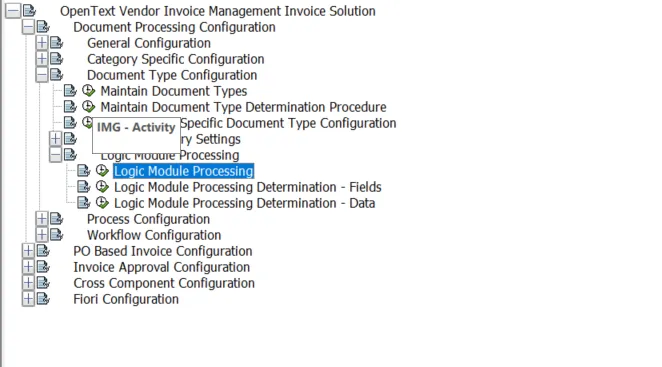
- Locate the entry with class /OPT/CL_D_LM_MAP_HEADER_PO and write down its module ID and process ID. Take them from your own system. They are not the same everywhere.
- Pick the scheduling point. Options are at process start, at rerun business rules, or both. Header match belongs at process start. It rewrites items, and rewriting items during a rerun means overwriting whatever the AP clerk just typed.
 3. Mind the sequence inside the process ID. It needs the PO item proposal and the header amount to be there already, so it goes after Determine PO Item Data and after the OCR item handling.
4. Map the process ID to the PO document types that should use it. Per document type, not globally. Start with one.

If the document types you care about already sit on a baseline process ID that you would rather not touch, copy it into a custom process ID, add the module there, and remap only the document types in scope. Baseline stays clean and you can back the change out in one entry.
Why it can help
PO invoices rarely get stuck because the amount is wrong. They get stuck on the item grid. One supplier line split across two OCR rows. A unit of measure written as PCE on the invoice and ST in the PO. Quantities in cartons against a PO in pieces. A freight line the supplier itemizes and the PO carries as a condition. The total is right, the posting would be right, and somebody still has to open the document and rebuild twelve rows by hand.
Header match takes that work away for the slice where it is provably safe. Once PO, GR and invoice amount agree, there is one sensible item proposal and SAP is already holding it. Three things follow.
- Item level rules compare the document against the MIRO proposal. If the items are the MIRO proposal, the comparison agrees by construction and the exception never gets raised.
- The clerk who does open the document sees the items that will actually post, not an OCR reconstruction of them.
- Extraction quality on item level stops driving the touch rate for these documents. Only the header has to be right.
The gain sits in ordinary three-way-match traffic with full goods receipt: materials, repeat orders, steady supply relationships. In those populations a fair share of invoices show up with a clean header and a messy item grid, and that is exactly what this clears.
It also sets up straight-through posting nicely. A document whose items came from the GR proposal and whose totals match leaves no open question for a human to answer, which makes it a candidate for automatic parking or posting rather than for another DP work item.
Limits and things to watch
The module overwrites, and overwrite means gone. Whatever the supplier sent on item level is no longer on the DP document afterwards. That is fine while the amounts agree and not fine a moment later, which is why the precondition is as narrow as it is. Resist the urge to widen it with a tolerance.
Three things worth checking before you switch it on.
- Partial goods receipt. All three amounts have to be identical, so partially received POs never qualify. This does nothing for your open-GR backlog.
- Anything downstream that reads item data. Custom BAdIs, archiving, item level approval logic, reporting on supplier item text: all of it will now see the GR proposal instead. Check before production, not after.
- Processing mode set to “Process start only”. Scheduled at rerun business rules, it quietly discards item edits every time the rules fire again.
Size it before you commit to it. Take a representative month and count the PO invoices where the header amount matched both the PO and the GR amount and an item level exception was raised anyway. That count is your business case. In some landscapes it runs into the thousands, in others it is close to zero, and the configuration effort is identical either way.