
How AIxVIM Extracts Invoice Data for SAP VIM: Architecture
How AI-based extraction AIxVIM replaces template-based capture in SAP VIM: where each component runs, and how they are secured.
In most VIM landscapes we work in, the workflow is not the problem. Roles, Chart of Authority, business rules and posting have been tuned for years and they do their job. The friction sits further upstream, in capture: maintaining templates, handling new vendor layouts and paying for a validation step that exists mainly to correct what OCR read wrong.
This post walks through how AIxVIM, our AI-based extraction for SAP VIM, is built. It covers where the components run, how entity determination works without the AI ever touching SAP tables.
One rule: replace capture, leave VIM alone
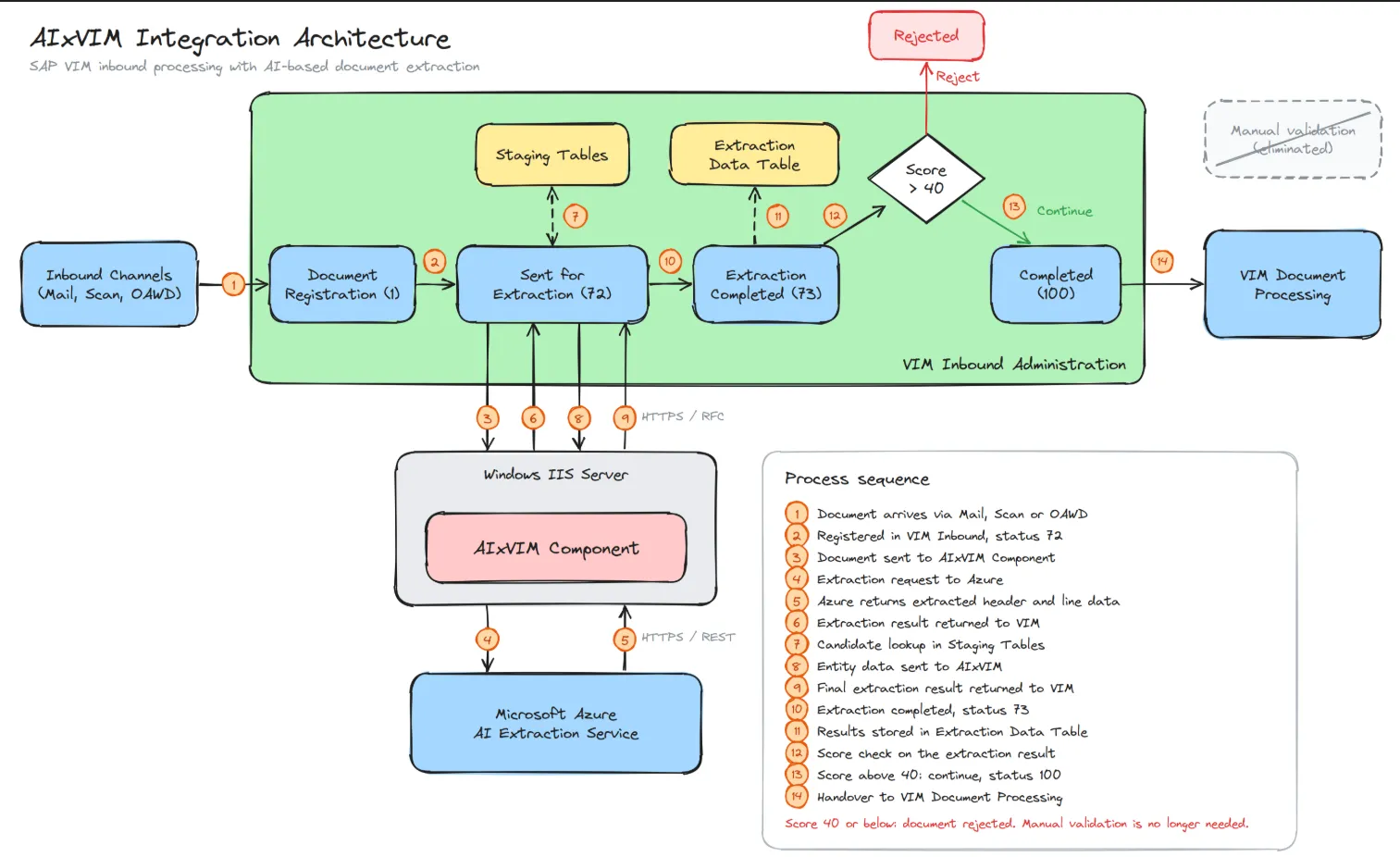
AIxVIM swaps out exactly one layer: the capture engine, meaning OpenText Intelligent Capture for SAP Solutions (IC4S) or Core Capture for SAP Solutions (CC4S). Everything after extraction stays standard. Documents still arrive through the same inbound channels, results still come back through the CC4S API, and the DP Document still enters the VIM Workplace with the same Process Types, Roles and business rules.
We kept to this rule for a practical reason. A capture replacement that also requires changes in the workflow turns into a VIM re-implementation, and almost nobody wants that. If the interface to VIM stays the same as before, the change is limited and easy to reason about, and rolling it back is easy too.
Note: The reference deployment described here uses Microsoft Azure and Azure AI Foundry. The connector itself is not tied to one provider, so other clouds or customer-hosted models can be plugged in the same way.
The starting point: classic capture
Most landscapes we see run IC4S or CC4S as the capture layer. A document enters through e-mail, scan or OAWD, is registered, and VIM Inbound Administration hands it to the capture engine. Template-based OCR reads the fields by position. A staging-table lookup produces vendor and company code candidates that go back to capture for a second pass. The result lands in the Extraction Data Table, optionally goes through manual validation, and then becomes a DP Document.
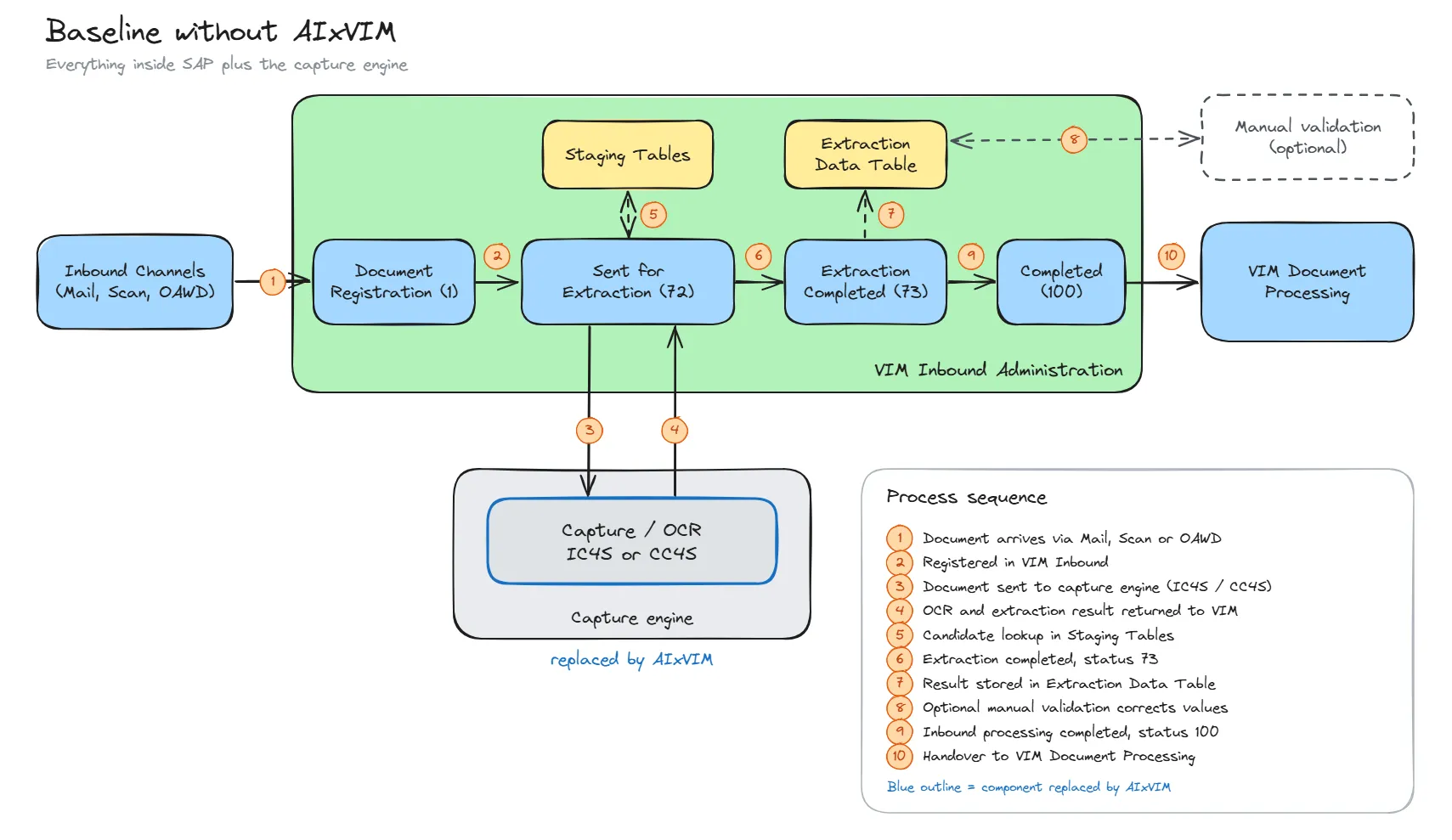
Only the Capture/OCR changes in the target state. Everything to its left, right and above stays as it is.
The target state
With AIxVIM, the capture engine is replaced by the AIxVIM Connector. It runs on a Windows server inside the customer landscape and acts purely as a client. The actual extraction runs in Azure AI Foundry, behind Azure API Management, in an Azure tenant the customer owns. Results come back through the CC4S API and show up in VIM Inbound Administration as before. The manual validation step is no longer needed. If a document scores below the configured threshold (for example 40), VIM Inbound rejects it automatically.
Entity determination without table access
This part usually surprises people. The AI never queries vendor or company code master data. SAP decides what the AI gets to see, and it only sends the candidates for the one document being processed.
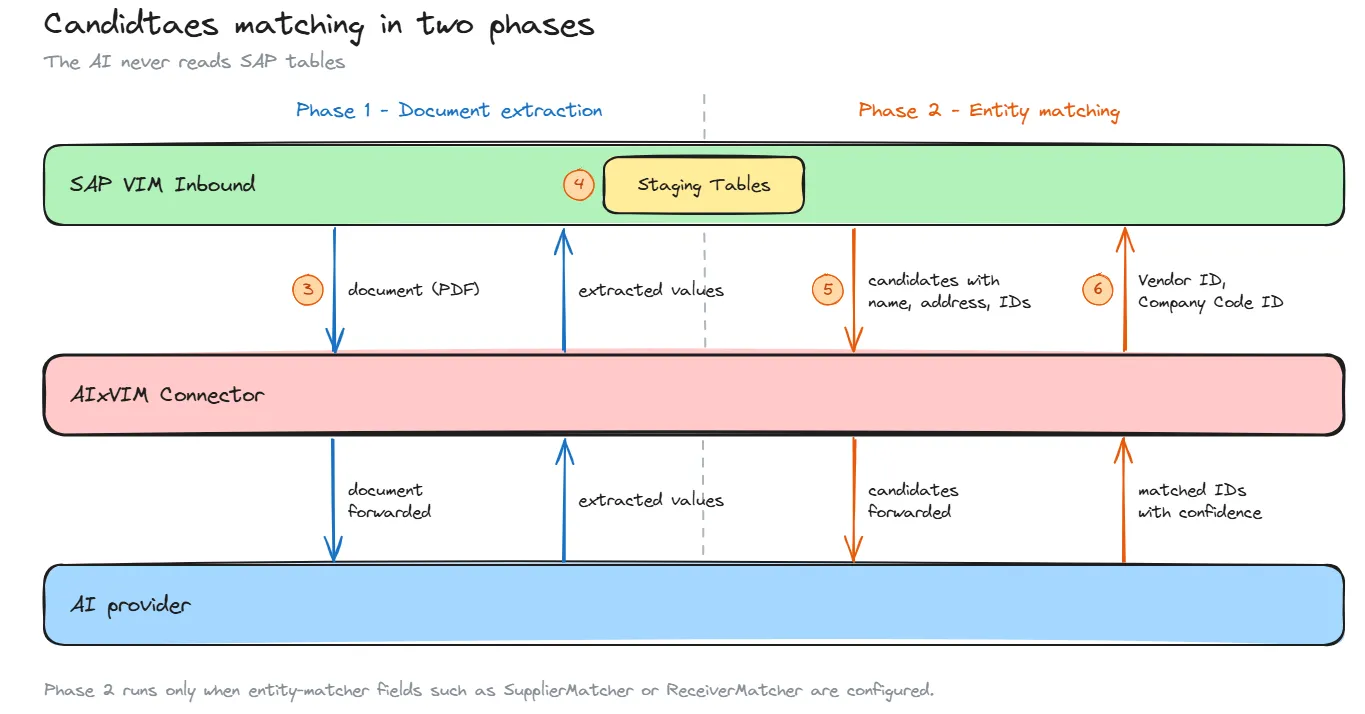
In phase 1 the document is extracted. VIM Inbound Administration then uses the extracted values to look up the staging tables and build a candidate list, which is the same mechanism the classic capture flow uses. If the scenario has no entity-matcher fields, this lookup is the final result and nothing else is sent.
If matchers are configured, phase 2 sends the candidate list with attributes such as name and address to the connector. The AI compares those candidates with the document and returns the matched IDs with a confidence score. This handles cases a strict lookup tends to miss, for example group companies that share an address and differ only in name, or addresses written in slightly different ways. The candidate data is used for that one round trip only and is not stored at the connector.
Scenarios without master data matching
Not every document type needs the matching round trip. Order confirmations for example, run a single-phase flow: VIM Inbound sends the document to the connector, the connector forwards it to the AI provider, and the extraction result comes back the same way. There is no staging-table lookup and no candidate list on the wire.
The same connector and the same channel serve both flows. Which one runs is decided by the scenario configuration, not by a separate installation.
How each connection is secured
Three principles shape the security model. AIxVIM never talks to the SAP database directly. Every call into SAP goes through the CC4S API. And the Azure side has no network path to SAP at all: it only ever sees what the connector sends it.
| Connection | Transport | Authentication |
| SAP to connector | HTTPS, RFC destination type G with SSL active | SSL client identity (PSE), connector CA certificates trusted via STRUST |
| Connector to SAP | HTTPS to a SICF service | Logon data or client certificate (mTLS), bound to a dedicated service user |
| Connector to Entra ID | HTTPS, TLS 1.2 or later | OAuth2 client credentials flow, one app registration per customer |
| Connector to Azure API Management | HTTPS, TLS 1.2 or later | Bearer token checked by the validate-jwt policy before anything reaches AI Foundry |
Getting started
AIxVIM integrates with SAP VIM through the Core Capture API, so no modifications to the VIM workflow are required. To see how extraction performs on your own documents, get in touch and we will run it against a sample of your documents.